Installation Instructions
Follow these simple steps to download and install the Chrome extensions from Chrome Vault.
Step 1: Download the Extension
To get started, download the extension from our GitHub repository. Click the link below and download the ZIP file:
GitHub RepositoryStep 2: Extract the ZIP File
After downloading, extract the ZIP file:
- Windows: Right-click the file and select "Extract All".
- macOS: Double-click the file to extract it.
- Linux: Use the terminal to run
unzip filename.zip.
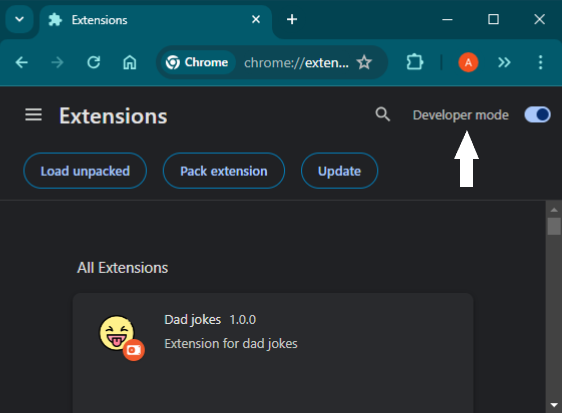
Step 3: Enable Developer Mode in Chrome
Open Chrome and navigate to chrome://extensions. Enable Developer Mode using the toggle switch in the top right corner.
Step 4: Load the Unpacked Extension
Click on "Load unpacked" and select the extracted folder from step 2.
Step 5: Testing the Extension
Once loaded, you should see the extension in your Chrome extensions list. You can now start using it.